
What It Really Takes to Build End-to-End Encryption in a Collaborative Mobile App
Our app: Obsetico
Obsetico is a personal asset and maintenance management app that helps users organize properties, equipment, and related records in one place. It supports multiple signed-in devices per user and real-time collaboration on shared assets.
Today, Obsetico uses Firebase Firestore as its backend database. All data is automatically encrypted at rest and in transit by Firebase, and Firestore security rules ensure that users can only access their own data or data explicitly shared with them. However, this model still allows us as developers—and Firebase administrators—to technically access and read user data. While this is common and acceptable for many apps, it is not ideal for a product that aims to be a true personal command center, since users usually store sensitive data in the app. This limitation is the main motivation behind our decision to explore and implement end-to-end encryption.
An overview of encryption
Feel free to skip to What is end-to-end encryption (E2EE) anyways? if you are already familiar with encryption basics.
In simple terms, encryption is the process of transforming readable data into an unreadable format using a mathematical algorithm and a secret value called a key. The original data can only be recovered using the appropriate key.
Modern encryption relies on well-studied cryptographic algorithms rather than secrecy of the algorithm itself. The security comes from the keys and from the mathematical difficulty of reversing the encryption without them. There are two main types of encryption.
Symmetric encryption
Symmetric encryption uses a single secret key to both encrypt and decrypt data. The basic properties of symmetric encryption are:
-
The same key encrypts and decrypts
-
It is very fast and efficient
-
It can easily handle large amounts of data
Common symmetric algorithms include:
-
AES (Advanced Encryption Standard): the industry standard, widely used and hardware-accelerated on mobile devices
-
ChaCha20: a modern alternative optimized for mobile and low-power devices
In practice, symmetric encryption is what you use to encrypt actual user data such as notes, attachments, and records.
The main challenge with symmetric encryption is key distribution: if multiple devices need access to the same data, they must all securely obtain the same secret key without exposing it.
Asymmetric encryption
Asymmetric encryption (also called public-key encryption) uses a key pair:
-
A public key, which can be shared freely
-
A private key, which must be kept secret
Data encrypted with a public key can only be decrypted using the corresponding private key.
Common asymmetric algorithms include:
-
RSA — older and widely supported, but slower and larger key sizes
-
Elliptic Curve Cryptography (ECC) — modern, faster, and more efficient (e.g. Curve25519)
Asymmetric encryption is computationally expensive and inefficient for large data. Because of this, it is usually not used to encrypt user data directly.
Instead, it is primarily used to:
-
Securely exchange symmetric keys
-
Authenticate devices or users
-
Enable secure key sharing between multiple devices or collaborators
Combining both: hybrid encryption
Most real-world systems, including end-to-end encrypted apps, use a hybrid approach:
-
A random symmetric key is generated on the device
-
User data is encrypted using this symmetric key
-
The symmetric key itself is encrypted using asymmetric encryption
-
The encrypted key is stored or shared safely
This approach combines the performance of symmetric encryption with the secure key exchange capabilities of asymmetric encryption.
Hashing vs Encrypting
Hashing is used for verification, not encryption. A hash function converts input data (like a password) into a fixed-length value that cannot be reversed. Instead of storing passwords, only their hashes are stored. When a user logs in, the password is hashed again and compared to the stored hash. If they match, the user is authenticated—without the original password ever being stored or revealed. In summary, hashing is one-way, while encryption is reversible with the correct key.
What is end-to-end encryption (E2EE) anyways?
This concept involves encrypting data on the sender’s device before transmitting it to another endpoint, usually another user’s device, and decrypting it only on the receiving user’s device. This way, the data is illegible to anyone outside these two users.
So, how does this apply to our case? We want to encrypt data on the user’s mobile device, send it to the server, and store it fully encrypted, so that no one can access it. Then, we want the same user to retrieve this information and decrypt it on their own device, allowing for more secure data storage.
In recent years, this model has increasingly become an expectation rather than a niche feature. Users are more aware of how their data is handled, especially when it includes personal, financial, or operational information. We experienced this firsthand early on, when a user explicitly asked whether Obsetico supported end-to-end encryption. That question made it clear that, for some users, strong privacy guarantees are not a “nice to have,” but a baseline requirement.
Why does this matter?
For Obsetico, implementing E2EE means:
-
Encrypting all sensitive data on the user’s device
-
Never sending encryption keys to the server in plaintext
-
Using asymmetric cryptography to securely share keys between devices
-
Using fast symmetric encryption for everyday data storage and syncing
Let’s start simple
Imagine we just have a single user trying to store their data in a secure way, from a single device. Keep in mind that this is overly simplified, some steps are skipped, and user authentication is actually managed by Firebase Auth in our case.
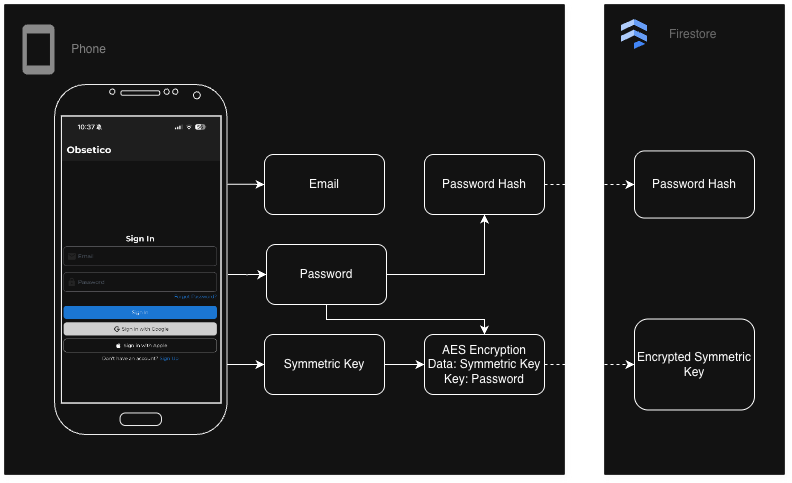
Account Registration
-
The user creates an account with email and password.
-
The password is hashed on the client.
-
The hashed password is sent to the server and stored in the database.
-
A symmetric key is generated using a cryptographically secure method. This key will be used to encrypt and decrypt all the user data.
-
The symmetric key is encrypted using the user’s password as a key.
-
The encryption symmetric key is both sent to the server to be stored in the database and saved in the device’s storage.
Sign in
-
The user enters email and password.
-
Password is hashed and compared to stored hashed password to verify identity.
-
If validation succeeds, the stored encrypted symmetric key is sent to the client, where it is decrypted using the password as key and later saved in the device’s storage.
Data encryption/ decryption
-
The user wants to store some data
-
Data is encrypted on the client using the stored symmetric key
-
Encrypted data is sent to the server for permanent storage
-
When the user reads data, encrypted data is sent to the client
-
The client uses the stored symmetric key to decrypt the data
What did this accomplish?
With this approach, the server only ever stores encrypted data. It never sees plaintext user data, encryption keys, or passwords. From the server’s perspective, all sensitive information is opaque ciphertext.
This model also provides a simple way to support multiple devices. A new device can authenticate using the same sign-in flow, retrieve the encrypted symmetric key, decrypt it locally using the user’s password, and gain access to the user’s data.
However, this simplicity comes with tradeoffs, most notably around key storage on the device. Persisting the symmetric key locally improves usability, since the user does not need to enter their password every time the app is opened, but at the same time, it increases the impact of device compromise: if an attacker gains access to the device and its storage, they may gain access to the symmetric key and, by extension, all of the user’s data.
This risk can be mitigated in several ways, such as using hardware-backed key storage (Secure Enclave on iOS, Android Keystore), adding biometric protection, or only keeping the symmetric key in memory while the app is running, requiring the user to sign in each time the app is opened.
What if the user forgets their password?
One of the trickiest challenges in end-to-end encrypted systems is account recovery. In traditional apps, forgetting your password usually means resetting it via email and having the server reassign a new one. But in a true E2EE model where encryption keys are derived from or protected by the password, a forgotten password often means lost keys and permanently unreadable data — unless a recovery mechanism was put in place.
Existing approaches to recovery
Various encrypted systems use different strategies to balance security and recoverability:
Recovery keys / backups
The user is given a recovery code or backup key at signup, which they must store somewhere safe. If they forget their password, they can use this recovery material to unlock their key.
Pros
- Simple and secure if the user keeps the key safe
Cons
-
Users often lose or misplace recovery keys
-
If the recovery key is lost, data is still unrecoverable
Trusted contacts / emergency access
In this approach, account recovery is delegated to other users instead of the server.
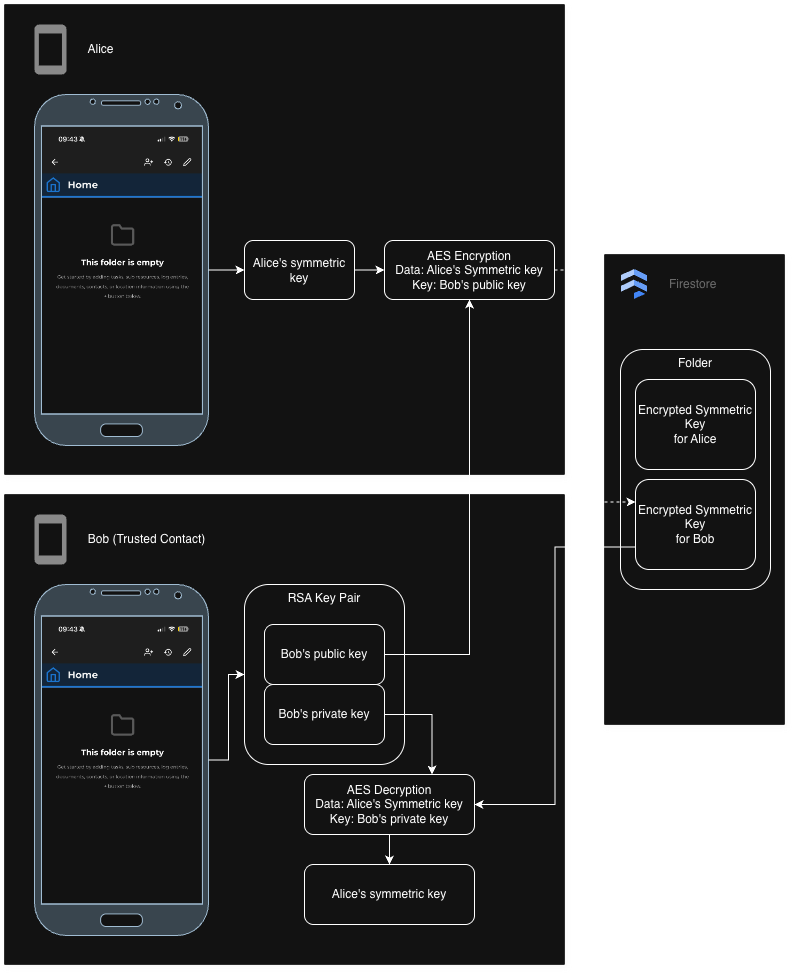
Setup
-
The user selects one or more trusted contacts and defines a waiting period.
-
Each trusted contact already has their own asymmetric key pair.
-
On the client, the user’s symmetric encryption key is encrypted using the trusted contact’s public key.
-
This encrypted recovery key is sent to the server and stored, but it cannot be decrypted by the server.
At this point, trusted contacts have no access to the user’s data.
Recovery request
-
If the user loses access to their account, a trusted contact can request recovery.
-
When a request is made, the waiting period begins.
-
During this period, the original user can approve or deny the request if they still have access.
Recovery execution
-
If the request is approved, or if the waiting period expires without denial:
- The encrypted recovery key is released to the trusted contact.
-
The trusted contact decrypts the recovery key locally using their private key.
-
This key can then be used to help restore access to the user’s encrypted data (for example, by re-encrypting keys under a new password).
At no point does the server gain access to plaintext keys or user data.
Pros
-
Preserves end-to-end encryption guarantees
-
Does not require the server to store recovery secrets
-
Recovery is explicit, delayed, and user-controlled
Cons
-
Requires trusting other users
-
More complex key management
-
Recovery depends on human availability and cooperation
Users will forget their passwords
For any app considering E2EE, thinking about recovery early is critical because:
-
Users will forget passwords
-
Losing access to encrypted keys means losing access to all their data
-
Traditional “reset via email” cannot work without weakening encryption guarantees
There is no perfect solution: all recovery mechanisms introduce some form of trust or additional risk. The goal is to make that tradeoff explicit and transparent to users.
Sharing data between users
Our initial design relied on a single symmetric key per user to encrypt all data. While this works well for private data, it breaks down when sharing is introduced: giving another user access would require sharing the same secret key, effectively granting full access to all of the user’s data. To support fine-grained, Google Drive-style sharing, we move to a hybrid approach where each shared folder has its own symmetric key, and that key is encrypted separately for each authorized user using asymmetric cryptography.
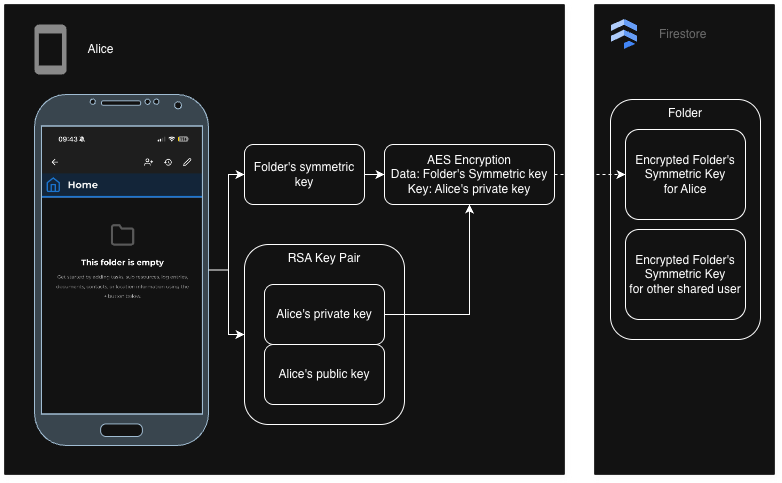
Creating a folder
-
When Alice creates her account, an asymmetric key pair is generated for her.
-
Alice’s public key is stored in plaintext and her private key is encrypted on the client using her symmetric key, for it to be stored securely on the server.
-
Alice creates a folder and a new folder symmetric key is generated to encrypt all folder data.
-
The folder symmetric key is encrypted using Alice’s public key (only her private key can decrypt it) on the client and sent to the server for storage.
Sharing a folder
-
To invite Bob to access the folder’s data, Alice asks the server for Bob’s public key.
-
On Alice’s device, she has the decrypted folder symmetric key, which she encrypts using Bob’s public key (only Bob can decrypt it with his private key).
-
The encrypted folder symmetric key for Bob is sent to the server for storage.
-
Bob can now retrieve the encrypted folder symmetric key and decrypt it to read folder data
Note: removing a user from a shared folder would only require deleting their encrypted folder symmetric key from the server. Keep in mind that each user has their own encrypted folder symmetric key, but they all decrypt to the same folder symmetric key.
When the server still needs to know something
End-to-end encryption aims to prevent the server from reading user data, but it does not eliminate the server’s role entirely. In practice, building a usable application still requires the backend to reason about some information. The challenge is deciding what the server is allowed to see, and understanding the tradeoffs of each option.
Access control and authorization
Even in an end-to-end encrypted system, the server is typically responsible for enforcing access control: determining which users are allowed to read or write specific encrypted records.
The most straightforward approach is to keep certain metadata in plaintext, such as:
-
Folder ownership
-
Lists of user IDs a folder is shared with
-
Document IDs and relationships
This allows Firestore security rules to ensure that only authorized users can access the corresponding encrypted blobs. The tradeoff is that while content remains private, access patterns and relationships are still visible to the server.
Other approaches exist, such as encrypting access control lists themselves or using capability-based access tokens, but these quickly add complexity. In many cases, they shift authorization logic to the client or require additional key exchanges, making revocation, auditing, and rule enforcement significantly harder. Most real-world E2EE systems therefore accept some degree of plaintext metadata in exchange for simpler, more robust access control.
Notifications and scheduled logic
Notifications introduce another challenge: they often depend on time-based conditions, such as task due dates. If all task data is encrypted, the server cannot evaluate whether a task is overdue or approaching its deadline.
One option is to handle notifications entirely on the client. This means each device decrypts its data and schedules local notifications on its own. While appealing from a privacy standpoint, this approach has several downsides:
-
Notifications may not fire if the app is not opened or the device is offline
-
Supporting multiple devices becomes difficult, as each device must independently schedule the same events
-
Shared data adds complexity, since one user’s device may need to notify another user
-
Platform limitations can restrict background execution or long-term scheduling
Because of these limitations, many systems rely on server-side schedulers that operate on limited plaintext metadata (such as timestamps), while keeping the actual content encrypted. Push notifications themselves can remain content-free and act only as a wake-up signal, with decryption and message construction happening locally on the device—an approach commonly used by end-to-end encrypted messaging apps.
Searching and filtering encrypted data
Searching and filtering become significantly harder once data is encrypted. Since the server cannot see encrypted fields, it cannot:
-
Perform text search
-
Filter by encrypted attributes
-
Sort results based on encrypted values
The simplest solution is client-side querying: the client fetches all encrypted documents it is authorized to access, decrypts them locally, and performs filtering or searching on-device. This works well for smaller datasets but does not scale indefinitely.
More advanced cryptographic techniques exist:
-
Searchable encryption attempts to address this by allowing the server to perform limited searches over encrypted data using special tokens generated on the client. In practice, this is usually restricted to exact-match or keyword searches and leaks information such as access patterns and query repetition. Because of these limitations and added complexity, it is rarely used for rich querying in real-world mobile applications.
-
Homomorphic encryption allows computations to be performed directly on encrypted data without decrypting it. In theory, this could enable server-side filtering and sorting, but in practice it is computationally expensive, complex to implement correctly, and not well suited to real-time mobile applications.
Because of these tradeoffs, most practical E2EE systems either accept client-side filtering or expose a minimal set of searchable plaintext fields.
A practical reality
End-to-end encryption protects content, not application logic. Real-world systems must balance privacy, usability, performance, and complexity. This often means allowing the server to see carefully chosen pieces of non-sensitive metadata, while ensuring that all user-generated content and encryption keys remain inaccessible.
Understanding and navigating these tradeoffs is a central part of designing an end-to-end encrypted application—and one of the main reasons implementing E2EE is far more nuanced than simply “encrypt everything.”