
How We Built Folder Sharing Without Losing Our Minds (or Our Data Model)
Obsetico is a personal asset and maintenance management app. Users organize their belongings into a hierarchy of folders containing tasks (things like “Service the car” or “Replace the water filter”). From early on, users asked for the ability to collaborate: sharing a home folder with a partner, or a work folder with a team.
Building a sharing system sounds deceptively simple. In practice, once you start thinking through edge cases (nested folders, who owns what, what happens when someone is removed), the complexity grows quickly. This article is a technical walkthrough of how the sharing system works in Obsetico, the design decisions behind it, and the tradeoffs we consciously accepted.
The data model
Everything in Obsetico lives in one of three entity types. Folders are analogous to directories; they can be nested arbitrarily deep with parent–child relationships. Tasks are the leaf-level items, always belonging to a folder, representing individual actionable items. Completions are metadata attached to a task recording when and by whom it was completed.
Sharing is enforced at the folder level only. This is a deliberate constraint: there is no per-task sharing, no per-completion sharing. A folder defines an access boundary, and everything inside inherits from it.
Each folder document in Firestore carries two key access-control fields:
type ResourceData = {
  ownerId: string; // the folder's true owner
  sharedWith: string[]; // UIDs of all users with access
  permissions: Record<string, UserPermission>; // per-user role assignments
  // ...
};

type UserPermission = {
  role: PermissionLevel; // "viewer" | "editor" | "admin" | "custom"
  custom: FieldPermissions | null;
};
When evaluating whether a user can read or write something, we check the sharedWith array of the folder it belongs to. If the user’s UID appears there, they have access; if not, they do not.
Inheritance
The most important property of the system is that permissions flow downward. If you share a top-level folder with someone, they automatically gain access to every subfolder, task, and completion nested within it, no matter how deep.
This mirrors the mental model users already have from tools like Google Drive: when you share a project folder, you expect your collaborator to see everything inside it.
Example: Alice has a folder structure like this:
Home
└── Garden
    └── Winter prep
        └── Task: Winterize irrigation
If Alice shares Home with Bob, Bob sees all of it: Garden, Winter prep, and the task inside. Alice does not need to share each subfolder individually.
Permissions can also be set explicitly on subfolders. If Alice separately shares Garden with Carol, Carol gains access to Garden and everything nested below it, but she does not see Home. This makes it possible to give someone a scoped view into part of a folder hierarchy without exposing the rest.
How inheritance is implemented
Inheritance is not computed at read time. Instead, when a parent folder’s sharedWith list changes, we immediately propagate the delta to all descendants using _updateChildrenSharing. This keeps the data denormalized but makes querying trivially simple.
When a user is added to or removed from a folder, the same UID change is pushed into every child’s sharedWith array recursively.
The denormalized approach has concrete benefits, and in Firestore it is also effectively the only viable approach. Firestore has no concept of joins or subqueries: you cannot express “give me all folders where the parent folder’s sharedWith contains this UID.” Every query must be answerable from the fields of a single document. This means that if we wanted to derive access from a parent at read time, we would have to fetch the parent, then the grandparent, and so on up the tree — one round-trip per level — before knowing whether a user can see any given folder. For a deeply nested hierarchy, or for a screen that needs to display dozens of folders at once, that is completely impractical.
Instead, by storing each user’s UID directly in the sharedWith field of every folder they have access to, the query for all folders a user can see becomes a single round-trip with no joins:
query(
  collection(db, "Resources"),
  where("deleted", "==", false),
  or(
    where("ownerId", "==", currentUid),
    where("sharedWith", "array-contains", currentUid),
  ),
  parentId !== undefined ? where("parentId", "==", parentId) : undefined,
);
It also has real costs. Every time a user is added to or removed from a shared folder, we issue one Firestore write per descendant. For a deep folder hierarchy with many children, this can mean dozens of writes in a single action. We mitigate this with Firestore batched writes (up to 500 operations per batch), but propagation time grows with the depth and breadth of the tree, not just the number of direct children.
A side effect of this design is that subfolders with their own explicit sharing accumulate UIDs from both their parent’s propagation and their own direct sharing.
The invitation system
Sharing does not happen instantaneously. When a folder owner invites someone, that person receives a notification and must explicitly accept the invitation before gaining access. Until they do, the folder is invisible to them.
This design choice matters for a few reasons. It avoids silently flooding someone’s workspace with folders they did not ask for. It gives the invited user a chance to decline if the share was a mistake or not relevant to them. It also creates a clear audit trail: you know exactly when access was granted.
Technically, the acceptance is split between client and server. The client sets the invitation’s status to "accepted" in Firestore, and a Cloud Function trigger picks up this change and writes the user into resource.sharedWith and resource.permissions. This split is not just an architectural preference: the Firestore security rules explicitly prevent any client from writing directly to the sharedWith field on a folder document. Without this restriction, a malicious client could add any UID to a folder’s access list by simply issuing a write, bypassing the invitation flow entirely. By locking sharedWith to server-side writes only, we ensure that access can only be granted through the Cloud Function, which validates that a legitimate pending invitation exists for the accepting user and that the role stored in that invitation is the one applied.
// Client side — flips the status, Cloud Function handles the rest
const _acceptInvitation = async (invitationId: string): Promise<void> => {
  await setDoc(
    doc(db, "Invitations", invitationId),
    { status: InvitationStatus.accepted },
    { merge: true },
  );
};
Only the folder owner, or a user whose managePermissions field permission is true (the admin role), can send invitations. Shared users without that permission cannot re-share the folder with others.
Ownership and the “created by ≠ owned by” distinction
This is one of the most counterintuitive parts of our model, and it is worth explaining carefully.
In most collaborative tools, the person who creates a document is considered its owner. In Obsetico, that is not the case. Any folder or task created by a shared user is owned by the original folder owner, not by the person who created it.
Here is a concrete example:
- Alice creates a folder called
Homeand shares it with Bob. - Bob creates a task
Clean the garageinsideHome. - Alice creates a completion for that task.
Despite Bob being the creator of the task, Alice is the owner. This has real consequences. Only Alice can delete Clean the garage. Bob can edit it, add completions, or move it between folders he has access to, but he cannot delete it. If Alice removes Bob from Home entirely, Bob loses access to Clean the garage even though he was the one who created it.
When a subfolder or task is created inside a shared folder, the current user’s UID is never used as ownerId. Instead, the parent folder’s ownerId is inherited.
This is a deliberate departure from tools like Google Drive, where a file’s true owner retains access regardless of what happens to the containing folder. We made this tradeoff to keep the permission model simple and predictable: the folder owner is always in control. There is no situation where a subfolder or task can outlive its owner’s folder structure in a way that creates orphaned or conflicting access.
How Google Drive handles this differently
To make the contrast concrete, consider the following scenario with two users building a deeper folder structure.
Manuela creates Folder A and shares it with Tomás. Inside Folder A, Tomás creates Folder B. Inside Folder B, Manuela creates Folder C. The ownership picture in Google Drive at this point is: Folder A owned by Manuela, Folder B owned by Tomás (because Tomás created it, even inside Manuela’s folder), and Folder C owned by Manuela (Manuela created it inside Tomás’ Folder B).
Now, if Manuela stops sharing Folder A with Tomás: Folder A disappears from Tomás’s shared drives view entirely. However, because Tomás is the true owner of Folder B, it does not vanish. It can no longer be reached by navigating through A, but Tomás can find it via the search bar, or it will appear elsewhere in their drive since they are its owner.
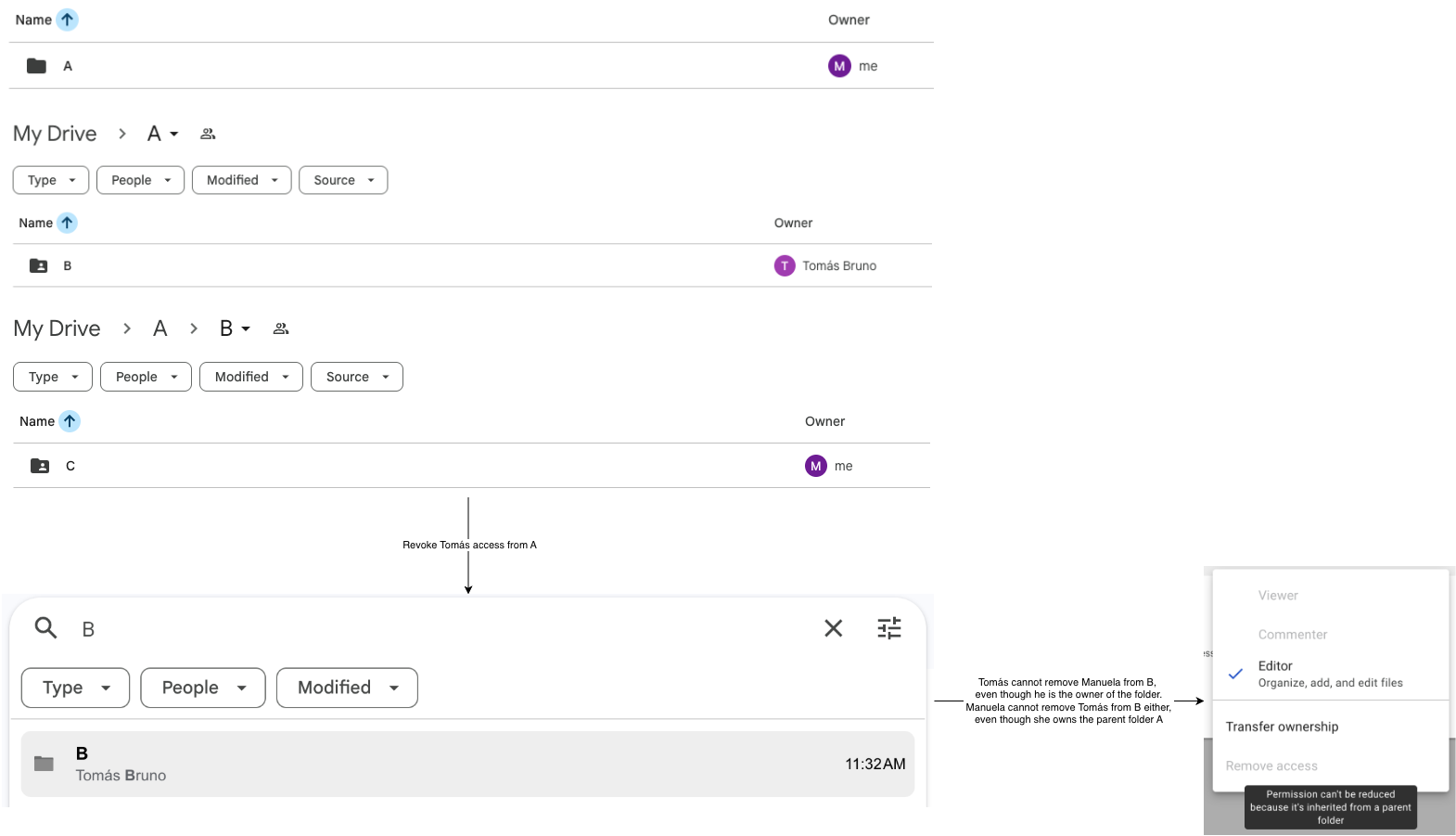
We invite you to explore more about this interaction by trying it out yourself. Create a folder, share it, create subfolders, and then unshare the parent. You will soon notice that there are several unintuitive edge cases that arise from the fact that ownership is tied to creation rather than the folder hierarchy. Look at differences between “Remove” and “Move to trash” actions in different folders, interact with removing access at different levels, and use the searchbar to find orphaned folders.
In our system, none of this ambiguity exists. The ownerId on every folder and task always matches the top-level folder’s original owner. If User 1 unshares Folder A with User 2, User 2 immediately loses access to A, B, and C simultaneously, because all three carry User 1’s UID as ownerId and User 2’s access was always derived from A.sharedWith. There are no orphaned folders, no content that only surfaces via search, and no confusion about who ultimately controls what.
Removing access
Removing a user from a folder’s sharedWith list immediately revokes their access to everything inside it: subfolders, tasks, completions, including content they personally created. There is no grace period and no partial retention.
This is done in two steps. First, the user’s UID is removed from the root folder, and their entry is deleted from the permissions map. Second, the same removal is propagated recursively to every descendant.
Moving folders and tasks
What should happen when a folder or task is moved to a different location in the hierarchy? The question is not trivial, and the answer has real implications for who can see what after the move.
The core tension is this: permissions are tied to the parent folder. If something moves to a new parent, should it keep its old permissions, merge them with the new parent’s permissions, or inherit the new parent’s permissions entirely? Keeping the old permissions would lead to a folder accessible to users who never had access to its new location, violating the hierarchical model entirely. We believe that the choice that keeps the model the most consistent is full replacement: a moved folder inherits the new parent’s permissions and nothing else.
This also simplifies the mental model for the owner. After moving something into a given folder, you can reason about who can see it purely from the target folder’s sharing settings. There is no hidden history of previous access to track down.
On the code side, when a folder’s parentId field changes, we read the new parent’s sharedWith list immediately and run a complete replacement across the moved folder and all of its descendants.
The tradeoff is that explicit shares on children get wiped. If subfolder X had been separately shared with Carol, and you move X into a different parent, Carol loses access immediately. Whether this is the right call is debatable. We believe it is: the alternative, preserving Carol’s explicit share across a move she was not involved in, would make reasoning about access significantly harder for the owner.
There is also an additional constraint on moves: only the folder owner can move folders, and a folder can only be moved to another folder the owner also owns. If you move a folder into a folder owned by someone else, you give up ownership of the moved folder. This limits the blast radius of surprise access changes to operations the original owner explicitly approved and keeps the ownership inheritant model consistent. For tasks, the same replacement logic applies. The task’s ownerId is resynced to match the new folder’s owner when resourceId changes.
Handling sharing conflicts in nested folders
Because any subfolder can be shared independently of its parent, it is possible for a user to have access to a subfolder without having access to its parent. This is what we call explicit sharing at the subfolder level: Carol sees Garden but not Home.
The Firestore query that underlies all folder listing makes this work naturally for the inherited case:
query(
  collection(db, "Resources"),
  where("deleted", "==", false),
  or(
    where("ownerId", "==", currentUid),
    where("sharedWith", "array-contains", currentUid),
  ),
  parentId !== undefined ? where("parentId", "==", parentId) : undefined,
);
The array-contains predicate operates on each folder’s own sharedWith field, not on the parent’s. Because inheritance propagates UIDs down the tree at write time, a user added to a parent will appear in every descendant’s sharedWith too. Querying with a parentId filter at each level of navigation therefore works correctly: the user’s UID is already present in the right place in every folder they should be able to see.
The interesting case is explicit sharing at a non-root level. Carol’s UID is in Garden.sharedWith but not in Home.sharedWith. When Carol opens her root folder view, the app queries with parentId: null. It returns folders where parentId == null AND sharedWith contains carol. Since Garden has parentId == home.id, it does not appear. This is correct: Carol has no access to Home, so she should not reach Garden by navigating down from the root.
However, Carol still needs to be able to access Garden at all. The application handles this with a dedicated secondary subscription that finds these “orphaned explicit shares”. Rather than relying on tree traversal, it fetches all folder IDs the user can already reach through normal navigation and then queries for any folder whose parent is not in that set:
const _onSharedRootResourcesSnapshot = (
  onSnapshotCallback: (resources: ResourceData[]) => void,
  filter: { accessibleResourceIds?: string[] } = {},
) => {
  const { accessibleResourceIds = [] } = filter;

  // Batched query: fetch the specific folder documents by ID
  const unsubscribe = createBatchedInSubscription<ResourceData>(
    accessibleResourceIds,
    id(),
    {
      buildQuery: (resourceFilter) =>
        query(
          collection(db, "Resources"),
          where("deleted", "==", false),
          resourceFilter,
        ),
      transformFn: resourceFromFirebase,
      onSnapshotCallback: (results) => {
        // Keep only folders whose parent is not in the accessible set,
        // i.e. folders that cannot be reached through normal navigation
        onSnapshotCallback(
          results.filter(
            (r) =>
              r.parentId !== null &&
              !accessibleResourceIds.includes(r.parentId),
          ),
        );
      },
    },
  );

  return unsubscribe;
};
These orphaned folders they appear as top-level entries regardless of their actual position in the tree. This two-subscription model ensures that direct navigation always respects parent-level permissions, while explicitly shared subfolders are never lost. The cost is an additional Firestore query on each load, but since both queries are covered by the sharedWith index, the overhead is acceptable.
Transferring ownership
What happens when the owner of a folder wants to leave it? The naive answer — just remove them — breaks down immediately. Without an owner, there is no one who can delete content, manage membership, or perform structural changes. The folder would effectively become frozen, with no way for anyone to clean it up.
We decided that ownership must always be held by exactly one user, and that transferring it is an explicit action the current owner must take before leaving. The transfer is only possible at the root level of a shared folder hierarchy: you cannot transfer ownership of a subfolder independently of its parent since this would break the hierarchical ownership. Transferring a parent automatically transfers all its subfolders and their contents recursively.
const _leaveResource = async (
  resourceId: string,
  newOwnerId: string,
): Promise<void> => {
  const userId = getAuth().currentUser!.uid;

  setDoc(
    doc(db, "Resources", resourceId),
    {
      ownerId: newOwnerId,
      sharedWith: arrayRemove(userId),
      updatedAt: new Date().toISOString(),
    },
    { merge: true },
  );

  // Propagate new ownerId to all children and remove the old owner from sharedWith
  await _updateChildrenSharing(resourceId, {
    removedUsers: [userId],
    newOwnerId,
  });
};
The _updateChildrenSharing call does double duty: it removes the outgoing owner’s UID from sharedWith on every descendant (since they are giving up access as well as ownership) and updates ownerId on every child to point to the new owner. After this completes, the new owner controls the entire subtree.
Design tradeoffs and things we considered
Why not per-task sharing? Per-task sharing adds a lot of complexity with limited benefit. Most real use cases involve sharing a project or a domain (for example, “share my home maintenance with my partner”), not a single task. Keeping sharing at the folder level makes the mental model simpler for users and reduces the surface area for access control bugs. The folder is a natural granularity boundary.
Why does “created by ≠ owned by”? Having two distinct notions of ownership (creator and true owner) would make the permission model significantly harder to reason about, both for us and for users. The Google Drive example above illustrates what happens when created-by ownership is taken seriously: content becomes scattered across different owners, and revoking a share produces a fragmented, hard-to-predict outcome. Keeping a single ownerId per item, always derived from the parent folder, makes every access question answerable with a single lookup.
Why require invitation acceptance? Silent sharing could feel intrusive. Users should not have to opt out of someone else’s decision to share a folder with them. The explicit accept/decline step keeps users in control of what appears in their workspace.
What about role-based permissions? We have four roles deeply integrated into the data model.
The schema defines a FieldPermissions object with fourteen individual capability flags:
export type PermissionLevel = "viewer" | "editor" | "admin" | "custom";

export type FieldPermissions = {
  viewContacts: boolean;
  editContacts: boolean;
  viewContactDetails: boolean;
  viewLocation: boolean;
  editLocation: boolean;
  viewFiles: boolean;
  addFiles: boolean;
  deleteFiles: boolean;
  viewTasks: boolean;
  editTasks: boolean;
  viewTaskHistory: boolean;
  addSubresources: boolean;
  deleteResource: boolean;
  managePermissions: boolean;
};
The three preset roles (viewer, editor, admin) each map to a fixed capability set defined in ROLE_PRESETS. viewer can read everything: contacts, location, files, tasks, and task history. editor adds write access: editing contacts and location, adding and deleting files, editing tasks, and creating subfolders. admin gets everything the editor has, plus the ability to delete the folder and manage permissions (i.e., invite users and change roles). The custom role bypasses the preset entirely and uses a per-user FieldPermissions object, allowing fine-grained control over every individual capability. This makes it possible, for example, to grant someone the ability to add files but not edit tasks, or to view tasks without being able to act on them.
There is also an important backward-compatibility layer. When we initially launched sharing, there were no roles: only a sharedWith array. Existing Firestore documents have users in sharedWith with no corresponding entry in the permissions map. We had to create a normalizePermissions function that handles this by granting admin to any sharedWith user who lacks an explicit entry, preserving the behavior those users had before roles existed:
export function normalizePermissions(
  sharedWith: string[],
  permissions: Record<string, UserPermission>,
): Record<string, UserPermission> {
  const normalized = { ...permissions };
  sharedWith.forEach((userId) => {
    if (!normalized[userId]) {
      normalized[userId] = { role: "admin", custom: null };
    }
  });
  return normalized;
}
Key takeaway
The sharing system is designed around a single principle: the folder owner is always in full control of the structure, while shared users are welcome collaborators who can contribute freely within that structure. When in doubt about an edge case, we defaulted to the interpretation that gives the owner the most predictable outcome.